Chapter 1. From Chat to Code: What Changes
Overview
- Purpose: Understand the difference between using AI for conversation and using AI to build working tools – and decide what you want to build first.
- You will build: A shortlist of three projects you want to create for your business, rated by difficulty.
- Prerequisites: Familiarity with AI chat tools like ChatGPT or Claude (Book 1).
The Story: Ninety Minutes and a Quote Calculator

Jake Mitchell had been using ChatGPT and Claude for almost a year. He ran Mitchell Landscaping in Raleigh, NC – 12 crew members, 4 trucks, 38 active residential properties – and AI had become part of his daily routine. He drafted client follow-up emails with it. He summarized contract documents. He once used it to rewrite his company’s entire FAQ page in an afternoon. He was, by any measure, good at using AI.
But he could not get it to build him a quote calculator.
The problem was specific: his company handled quotes by hand. Customers called, Denise – his office manager, been with him five years – asked about yard size, what services they wanted, pulled up a spreadsheet of prices, and emailed back a number. Sometimes it took a day. Sometimes they lost the lead. Jake had tried three off-the-shelf quoting platforms. One was $89 per month and didn’t handle his seasonal pricing tiers. One required customers to create an account, and half of them bounced. The third almost worked, but its pricing formulas broke every time he updated his rates.
He mentioned this to a friend at a dinner party – a marketing consultant who had recently built a client intake form using something called Cursor, an AI-powered code editor that writes software instead of text. “I described what I wanted and it built the thing,” he said. “Took me a couple hours.” Jake was skeptical. He had tried asking Claude – the AI chatbot he used daily – to write him a quote calculator once. It had given him pages of code he didn’t know what to do with. He’d copied it into a text file, stared at it, and closed the laptop.
But the next Saturday morning, he downloaded Cursor. It looked like a text editor – tabs across the top, a file list on the left, a dark background. He opened the Composer panel and typed: “Build me a quote calculator for a landscaping company. Customers should be able to enter their lawn size, select services they want (mowing, edging, leaf removal, seasonal treatments), toggle seasonal pricing, and get an instant price estimate. I should see all submitted quotes on a dashboard.” He pressed Enter.
Cursor started generating files. It created a project structure, wrote HTML for the customer-facing page, JavaScript for the pricing logic, a simple data store for quotes. After about two minutes, it told him to run a command in the terminal. He didn’t know what a terminal was. He Googled it, found it at the bottom of the Cursor window, typed the command, and a browser tab opened with his quote form. It was ugly – default fonts, no colors, inputs crammed together – but it worked. He could enter a lawn size, check off some services, hit Calculate, and a price estimate appeared. The quote showed up on the dashboard page.
Then he hit the first wall. He selected a 5,000-square-foot lawn, checked mowing and edging, and got a price. Then he changed the lawn size to 500 square feet and got the same price. The calculator wasn’t scaling by lawn size at all. He typed into Composer: “The price should scale based on lawn size. A 5,000 sq ft lawn should cost more than a 500 sq ft lawn. Use a per-square-foot rate for each service.” Cursor rewrote the pricing logic. He tested it. The prices now scaled correctly. He ran three more combinations. All correct.
Over the next hour, he made Composer add a seasonal pricing toggle, a confirmation message after the quote was generated, and a simple filter on the dashboard so Denise could view quotes by date. One thing broke: the date filter showed all quotes regardless of which date was selected. He pasted the problem back into Composer – “The date filter on the dashboard isn’t filtering. It shows all quotes no matter which date I pick.” Cursor found a bug in how it was comparing dates (it was comparing text strings instead of actual dates) and fixed it. That debugging loop took 20 minutes.
Ninety minutes after downloading Cursor, Jake had a working prototype of a quote calculator. It was not ready for customers – it had no real database, no email delivery of quotes, no connection to his scheduling system. But it worked. He could see exactly what needed to be added. And he had built it himself, without writing a single line of code by hand.
“I didn’t understand the code,” he said later. “I still don’t. But I understood what the tool was supposed to do, and I could tell when it wasn’t doing it right. That turned out to be enough.”
What Actually Changed
Jake’s story is not about a miracle. The quote calculator he built in 90 minutes was a prototype, not a finished product. Getting it production-ready – adding a real database, connecting it to his email system, handling seasonal rate changes, making it look professional – took him another two weekends and some help from Chapter 7 of this book.
But something had shifted. For a year, Jake used AI as a writing partner. He gave it words, and it gave him better words back. That day, he gave it a description of a business problem, and it gave him a working tool. Not a document about a tool. Not a recommendation to buy a tool. An actual tool he could open in a browser and click through.
That is the shift this chapter is about. You already know how to use AI for text. This book teaches you to use AI for building. The workflow is different, the skills are different, and the results are different. But the starting point is the same: you describe what you want, clearly and specifically, and the AI does the technical work.
Quick Win (15 Minutes)
Open two browser tabs:
Cursor: Go to cursor.com. Read the homepage. Watch the demo video if there is one. Look at the pricing page – the Pro plan is $20 per month.
Claude Code: Go to claude.ai/code or search “Anthropic Claude Code.” Read what it does. Note that it’s included with a Claude Pro subscription at $20 per month.
Now grab a piece of paper or open a note on your phone. Write down three things you wish you had for your business. Not software categories – specific problems. Not “a CRM” but “a way to track which leads I’ve followed up with this week.” Not “a website” but “a page where customers can see my availability and request a quote.”
Don’t judge whether they’re possible yet. Just write them down. You will come back to this list throughout the book.
What Vibe-Coding Is (and Where the Name Came From)
In February 2025, Andrej Karpathy – a computer scientist who co-founded OpenAI and led Tesla’s AI division – posted about a new way he’d been writing software. He described sitting down, telling the AI what he wanted, accepting the code it wrote without fully reading it, and just running it to see if it worked. If something broke, he’d paste the error back and let the AI fix it. He called this “vibe-coding” – coding based on the vibe of what you wanted rather than the precise technical specification. You describe the feel and function of what you want, and the AI handles the implementation.
The term caught on fast. By the end of 2025, Collins Dictionary named “vibe-coding” the Word of the Year. It had moved from a developer’s casual observation to a label for an entire movement: people building software by describing it in plain English rather than writing it by hand.
Here is what vibe-coding actually looks like in practice:
You describe what you want the tool to do. Not what it should look like, not what programming language to use – what it should do. “When a customer submits this form, save their information and send me an email notification.”
The AI generates code. Files appear. You probably can’t read them. That’s fine.
You run it. Either the AI runs it for you (in tools like Cursor’s Agent mode) or you type a short command it gives you.
You test it. Does the form save the data? Did you get the email? Did the confirmation message show up?
If something is wrong, you describe the problem. “The email notification isn’t sending.” “The form accepts empty submissions – it should require a name and email.” The AI fixes it.
You repeat steps 3 through 5 until it works.
This is not the same as no-code tools like Squarespace or Wix, which give you drag-and-drop builders with pre-made templates. Vibe-coding produces actual code – JavaScript, Python, HTML – that you own and can modify, move, or extend. You just don’t have to write it yourself.
And it is not magic. Every build story in this book includes at least one thing that broke, one error message, and one round of back-and-forth with the AI. That’s normal. The skill isn’t getting the AI to produce perfect code on the first try. The skill is describing the problem clearly enough that the AI can fix it.
The Builder Tool Landscape
There are dozens of AI building tools available as of early 2026. The market is growing fast and new ones launch regularly. You do not need to learn all of them. Here are the ones that matter for this book, organized by how much setup they require.
Zero Setup: Browser-Based Builders
These run entirely in your browser. No downloads, no installation, no terminal. You type a description, the AI builds it, and you see the result immediately.
v0.dev – Made by Vercel (the company behind the hosting platform we’ll use later). Generates user interface components from descriptions. Free tier available; paid plan is $20 per month. Best for generating the visual parts of an app – forms, dashboards, landing pages. Does not handle databases or behind-the-scenes logic on its own.
Bolt.new – Made by StackBlitz. A full building environment in the browser. You describe an entire application, and it generates both the visible parts and the behind-the-scenes logic. Deploys your finished app to the internet with one click. Free tier with limited use; full plan is $25 per month. Good for rapid prototyping, but the code quality varies and complex projects can hit limits quickly.
Replit – A browser-based coding environment with an AI agent that can build applications from descriptions. Also includes built-in hosting. Free tier available; Core plan is $25 per month. Particularly good for learning and quick experiments.
Installed Tools: More Power, More Control
These live on your computer. They require downloading and some initial setup (Chapter 2 walks you through it), but they give you much more control over what you build.
Cursor ($20 per month for the Pro plan) – An AI-powered code editor. It looks like a text editor with a chat panel on the side. You describe what you want, and it writes the code directly into files on your computer. It can also read your existing files, understand the context of your project, and make changes across multiple files at once. This is the primary visual tool we use in this book. It has over a million daily users and is the fastest-growing developer tool by revenue.
Claude Code ($20 per month, included with a Claude Pro subscription) – Anthropic’s command-line tool. Instead of a visual editor, you interact with it through your terminal – the text-based interface on your computer. You type a description of what you want, and it reads your project files, generates or edits code, and can even run commands for you. It works with any editor and any project, which makes it the most flexible option. Where Cursor works best at the file level, Claude Code works at the project level – it can coordinate changes across dozens of files in a single operation.
The Recommended Progression
If you have never built anything with code before, here is the order that works best:
Start with v0.dev or Bolt.new. No installation. You’ll see results in seconds. Build two or three small things – a landing page, a form, a calculator. This teaches you the feedback loop: describe, generate, test, iterate. Spend a week or two here.
Move to Cursor when you need more control. When browser tools hit their limits – and they will, usually around the point where you need a database or user accounts – install Cursor. It is a bigger learning curve (expect two to three weeks to feel comfortable), but it gives you full control over your project files. This is where most of the building in this book happens.
Add Claude Code for project-level complexity. Once you have a project with multiple files and interconnected parts, Claude Code becomes valuable. It can read your entire project, understand how the pieces fit together, and make coordinated changes. Many builders use Cursor and Claude Code together – Cursor for visual editing, Claude Code for big-picture changes.
You do not need all of these on day one. Chapter 2 covers the setup for Cursor and Claude Code. Browser-based tools require nothing but a web browser and an account.
What You Can Build (and What You Cannot)
This is the section that saves you from wasting a month. AI building tools are remarkably capable for certain kinds of projects and genuinely unreliable for others. Knowing the difference before you start is the single most valuable thing this chapter teaches.
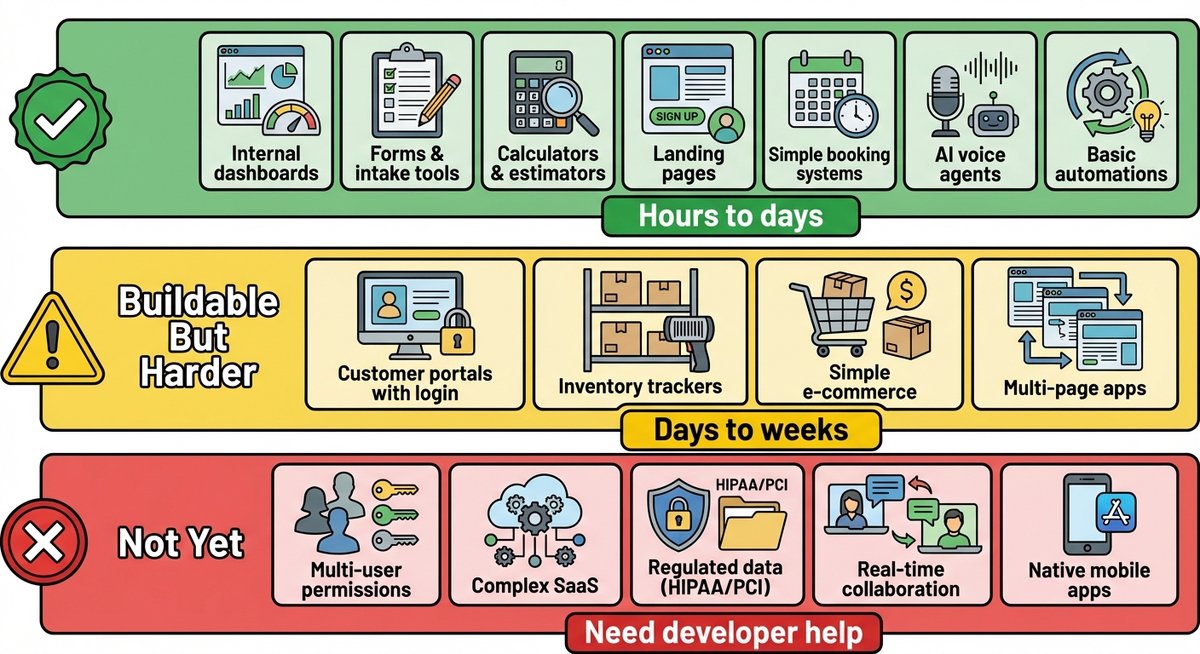
Buildable: High Confidence
These are projects where AI tools consistently produce working results for non-developers. Expect to spend hours to days, not weeks.
- Internal dashboards. A page that pulls data from a spreadsheet or database and displays it with charts, filters, and tables. Your team uses it daily, but customers never see it.
- Forms and intake tools. A customer-facing form that collects information, validates it, and stores it somewhere useful. Quote request forms, appointment requests, feedback surveys.
- Calculators and estimators. Pricing calculators, ROI estimators, project cost tools. These are self-contained – no database needed, no user accounts.
- Landing pages and marketing sites. Single-page or multi-page websites with content, images, and a contact form.
- Simple booking systems. Time-slot-based scheduling for appointments, consultations, or services.
- AI voice agents. Phone-based AI assistants that answer calls, collect information, and route callers. We cover these in detail in Part III.
- Basic automations. “When a new row appears in this spreadsheet, send an email.” “When a form is submitted, create a task in my project tracker.”
Buildable but Harder: Set Realistic Expectations
These projects are possible but take longer, require more iteration, and will test your patience. Expect days to weeks.
- Customer portals with user accounts and login.
- Inventory trackers with create, read, update, and delete functionality.
- Simple e-commerce with payment processing (using Stripe).
- Multi-page applications with navigation and interconnected data.
For these, plan on the first working version taking a weekend and the polished version taking another two to three weekends. The gap between “it works on my laptop” and “customers can use it reliably” is real, and Chapter 7 is entirely about closing that gap.
Not Buildable (Yet): Avoid These
Do not start here. These projects have complexities that AI tools regularly get wrong, and fixing the mistakes requires developer-level knowledge.
- Multi-user platforms where different users have different permissions (admin vs. staff vs. customer). AI tools frequently generate broken or insecure permission systems.
- Complex SaaS products with subscription billing, team management, and multi-tenant data isolation. These need architecture that AI tools do not plan well.
- Anything with regulated data. Healthcare records (HIPAA), financial data (PCI), student records (FERPA). Compliance requirements are specific and the consequences of getting them wrong are legal, not just technical.
- Real-time collaboration tools like Google Docs or multiplayer applications. The underlying technology (conflict resolution between simultaneous users) is genuinely hard even for experienced developers.
- Native mobile apps for the iPhone App Store or Google Play Store. The app store submission process, device-specific behavior, and offline functionality add layers of complexity that vibe-coding handles poorly.
This does not mean these things are impossible forever. The tools improve every few months. But in early 2026, attempting them without developer help will likely waste your time and leave you frustrated.
The Difference Between Generating Code and Directing a Build
When Jake pasted his quote calculator description into Cursor, he was not “writing code.” But he was not doing nothing, either. He was directing a build – describing behavior, testing results, identifying problems, and specifying fixes.
This is a different skill from using AI for text. When you ask Claude to write an email, you evaluate the output by reading it. Does it sound right? Does it say what I mean? You are an expert evaluator of emails because you have read and written thousands of them.
When you ask Cursor to build a quote calculator, you evaluate the output by using it. Does the form accept input? Does the date filter work? Does the price scale correctly with lawn size? You are an expert evaluator of your own business needs because you have lived them every day. You do not need to read the code. You need to test the behavior.
But there is a catch. When something goes wrong, you need to describe the problem precisely enough for the AI to fix it. “It doesn’t work” is not helpful. “When I select Tuesday on the date filter, it shows appointments from all days, not just Tuesday” is helpful. The more specific your description of what is broken, the faster the AI fixes it.
This is why you do not need to learn to program, but you do need to learn to direct. Directing means:
- Describing behavior, not appearance. “When the user clicks Submit with an empty email field, show a red message that says ‘Email is required’” is better than “make the form look nice.”
- Testing systematically. Try the obvious path (fill out the form, submit, see the result). Then try the edge cases (submit with nothing filled in, submit with an invalid email, submit twice in a row).
- Reporting problems with specifics. What did you do? What did you expect to happen? What happened instead? These three pieces of information are what the AI needs to fix a bug.
If you managed employees, vendors, or contractors, you already have this skill. You describe what needs to happen, check whether it happened correctly, and give feedback when it didn’t. Building with AI is the same workflow, with a faster feedback loop.
The Book’s Recommended Stack
Throughout this book, we use a specific combination of tools and services. Here is what they are and what each one does, in plain English:
- Next.js – A framework (a set of pre-built pieces) for building web applications. It handles both what users see in the browser and the behind-the-scenes logic. It is Vercel’s default, which means the two work well together.
- Python – A programming language often used for behind-the-scenes logic, automations, and working with AI APIs. Claude Code is particularly strong with Python.
- Vercel – A hosting service. It takes your project files and puts them on the internet so people can access them through a URL. Free for small projects. Works with one click once configured.
- Railway – A service for hosting databases. It runs PostgreSQL (the database) for $5 per month with no auto-pause behavior. We chose it over alternatives because it stays running even if no one uses your app for a week.
- PostgreSQL – A database. It stores your application’s data – customer records, bookings, inventory items, whatever your tool needs to remember.
You do not need to understand these deeply right now. Chapter 2 walks through setting up the tools you need. The rest of the book introduces each piece as you need it.
Common Mistakes
| Mistake | What Happens | What to Do Instead |
|---|---|---|
| Starting with your most ambitious idea | You spend a weekend, get 60% of the way there, hit a wall you can’t get past, and quit. | Start with something small – a calculator, a form, a single-page dashboard. Get a win first. Build confidence. |
| Describing appearance instead of behavior | “Make it look modern and clean” produces generic output. The AI guesses what you mean and guesses wrong. | Describe what the tool should do. “When the user enters a zip code, show the three nearest store locations with addresses and phone numbers.” |
| Accepting the first output without testing | The AI’s first version usually looks right but has bugs. Date filters that don’t filter. Forms that accept blank submissions. Buttons that do nothing. | Test every feature. Fill out forms with bad data. Click every button. Try to break it. If it breaks, describe how and let the AI fix it. |
| Thinking “I’ll learn to code later” to fix things | You will not. And you do not need to. The AI can fix its own code when you describe the problem clearly. | Learn to describe problems precisely, not to read code. “The quote includes the customer’s name but not the selected services” is a better fix request than any code you could write. |
| Comparing your timeline to a developer’s | A developer would build Jake’s prototype in 20 minutes, not 90. That’s irrelevant. Jake doesn’t have a developer. He has a Saturday morning and a $20 subscription. | Compare your timeline to the alternative: hiring a developer ($2,000-$10,000 for a quote calculator), buying off-the-shelf software ($50-$200 per month that doesn’t quite fit), or continuing with the manual spreadsheet process. |
Key Takeaways
- Vibe-coding – building software by describing what you want in plain English – was coined by Andrej Karpathy in February 2025 and became Collins Dictionary’s Word of the Year in 2025.
- The jump from “AI writes my emails” to “AI builds my tools” is real, but it requires a different workflow: describe behavior, test the result, report problems specifically, iterate.
- Browser-based tools like v0.dev and Bolt.new require zero setup and are the best starting point; Cursor ($20/mo) and Claude Code ($20/mo with Claude Pro) offer more power once you’re ready for it.
- Internal tools, dashboards, forms, calculators, and booking systems are reliably buildable; complex SaaS products, regulated-data applications, and native mobile apps are not – yet.
- You do not need to learn to program, but you do need to learn to direct: describe behavior, test results, and report problems with enough specificity that the AI can fix them.
What You’re Shipping This Week
Next Up
In Chapter 2, you’ll install Cursor, Claude Code, and everything else you need to start building. The whole setup takes about 45 minutes, and most of the confusion comes from one thing: the terminal, which is just a text-based way to talk to your computer.