Chapter 1. The AI Landscape in 2026: What’s Real, What’s Hype
Overview
- Purpose: Cut through the noise and give you an honest map of what AI tools exist, what they cost, and what they actually do for small businesses
- You will learn: What the major AI tools are, what each is good (and bad) at, and how the pricing works
- Tools needed: None yet (this chapter is orientation)
- Time to implement: 20 minutes of reading, then 5 minutes for the quick win at the end
The Story: “I Thought It Was All Hype”
Marcus runs a 12-person marketing agency in Denver. Last March, a client asked if his team was using AI. Marcus said no. The client said their previous agency had been, and the work was faster and cheaper.

That stung. So Marcus did what most busy business owners do when they feel behind: he panicked and overspent. He signed up for ChatGPT Plus ($20/month), Claude Pro ($20/month), Gemini Advanced ($20/month), Midjourney ($30/month), Jasper ($50/month), and a “content optimization” tool a LinkedIn influencer recommended ($79/month). Total: $219 per month, just for himself. He told his team to “start using AI” without much guidance on which tool or what for.
Two months later, Marcus had spent $438 and couldn’t point to a single thing AI had done better than his team was already doing. His designers hated Midjourney’s output. His writers said ChatGPT’s drafts sounded like “a press release written by a committee.” The Jasper subscription went unused after the first week. The content optimization tool mostly told him things he already knew.
Marcus almost cancelled everything.
Then his office manager, Dana, asked if she could use ChatGPT to draft responses to the 40-plus client emails she handled every day. She didn’t ask for a strategy. She just started pasting emails into the free version during her lunch break, asking it to write professional responses, and editing the results.
Within a week, Dana was handling email in half the time. She had extra hours for invoicing and scheduling. Nobody on the team noticed the emails were AI-assisted because Dana edited every one to sound like herself.
Marcus cancelled four of his five subscriptions. He kept ChatGPT Plus for $20/month. He gave Dana access too. That $40/month investment saved his agency roughly 15 hours per week. The other $179/month had been wasted.
That ratio matters. Most of the money small businesses spend on AI is wasted. Not because AI doesn’t work, but because they’re buying tools before they know what problem they’re solving. This chapter will make sure you don’t do that.
A note on the stories in this book: The people and businesses are composite examples drawn from real scenarios, interviews, and publicly reported cases. Names and identifying details have been changed. The situations, tools, costs, and outcomes are realistic and representative, but no story describes a specific individual or company.
What “AI” Actually Means in 2026 (Without the Jargon)
When people say “AI” in a business context right now, they almost always mean one thing: tools you can talk to in plain English that generate text, images, code, or analysis in response.
The technical term is “large language model,” but you don’t need to remember that. Think of it this way: these tools are very good autocomplete. They’ve read an enormous amount of text and learned patterns. When you give them a prompt, they predict what useful response should come next.
That means they’re great at:
- Drafting things. Emails, proposals, social posts, job descriptions, customer responses, reports. Anything where you need a solid first draft you can edit.
- Summarizing things. A 30-email thread, a 50-page contract, a meeting transcript, a long article. Turn it into five bullet points in seconds.
- Explaining things. “What does this clause in my lease mean?” “Why is this Excel formula returning an error?” “What’s the difference between an LLC and an S-Corp?”
- Organizing things. Sorting messy data, categorizing expenses, extracting information from documents, turning scattered notes into structured formats.
They’re not great at:
- Being right about facts. AI tools will confidently make things up. They’ll cite sources that don’t exist, invent statistics, and state incorrect information with perfect grammar. You have to check their work.
- Doing math. They can write a formula for you, but don’t trust them to do the calculation themselves. Use a spreadsheet.
- Knowing your business. They don’t know your customers, your pricing, your policies, or your preferences unless you tell them every time (or set up a system to feed them that context).
- Replacing judgment. They can draft a response to an angry customer. They can’t decide whether to offer a refund, fire a vendor, or raise your prices.
Keep this in mind throughout the book. AI is a drafting and organizing tool that requires editing and oversight. It’s a very talented intern who works fast, writes well, knows a lot of general information, and will occasionally make something up with complete confidence.
The Four Tools That Matter
There are dozens of AI tools. You need to know about four. Everything else is either a wrapper around one of these four, a specialty tool for a specific task, or marketing hype.
ChatGPT (by OpenAI)
This is the one everyone’s heard of. It’s the most popular AI tool in the world with 800 million weekly users. It’s good at creative writing, brainstorming, and general-purpose tasks. The free version is functional but limited. The $20/month Plus plan gives you the latest model (GPT-5.2), image generation with DALL-E, file uploads, and web browsing.
What it’s best at: Creative writing, brainstorming, generating ideas, image generation, general “I need help with something” tasks.
Where it falls short: Long documents (it can lose track of details), highly technical analysis, tasks that require precise consistency across multiple outputs.
The controversy you should know about: OpenAI announced in January 2026 that it’s adding ads to the free version of ChatGPT. They briefly showed users promotional messages mid-conversation before pausing the program after backlash. A researcher resigned over it. If you’re using the free tier, know that your conversations may be used to target ads. The $20/month Plus plan is ad-free.
Claude (by Anthropic)
Claude is ChatGPT’s biggest competitor and increasingly the tool that professionals prefer for serious work. It’s known for being more careful, more detailed, and better at following complex instructions. The free version is decent. The $20/month Pro plan gives you the latest model (Claude Opus 4.6), which can process extremely long documents (an entire book’s worth of text in one conversation).
What it’s best at: Long documents, detailed writing, editing, research, coding, anything where precision matters more than creativity. If you need to upload a 50-page contract and ask specific questions about it, Claude is your tool.
Where it falls short: Image generation (it doesn’t have built-in image creation like ChatGPT), creative brainstorming (it tends to be more measured and less playful).
What’s generating buzz: A Google engineer publicly admitted in January that Claude reproduced in one hour a system her team spent a year building. Spotify revealed that their best developers haven’t written a line of code since December because they use an internal system built on Claude. These are developer stories, but they signal where the technology is heading.
Gemini (by Google)
Gemini is Google’s AI, and its biggest advantage is that it’s built into Google Workspace. If your business runs on Gmail, Google Docs, and Google Sheets, Gemini is already there. It recently passed 750 million monthly users and is growing faster than any other AI tool.
What it’s best at: Integration with Google tools you already use. Summarizing Gmail threads, helping write in Docs, generating formulas in Sheets, creating meeting notes in Google Meet. If you’re a Google Workspace shop, this is your lowest-friction option.
Where it falls short: Standalone creative tasks (it’s more utilitarian than ChatGPT), and its advanced features require the $14/user/month Business Standard plan, which adds up for teams.
Microsoft Copilot
Copilot is Microsoft’s AI, embedded into Word, Excel, PowerPoint, Outlook, and Teams. If your business runs on Microsoft 365, Copilot is the equivalent of Gemini for Google users.
What it’s best at: Working inside the Microsoft apps you already use. Writing in Word, generating formulas and charts in Excel (including a new feature that puts AI directly inside individual cells), creating presentations in PowerPoint, summarizing email threads in Outlook, and generating meeting notes in Teams.
Where it falls short: It’s the most expensive option. Microsoft recently dropped the price to $18-21/user/month (down from $30), but that’s on top of your existing Microsoft 365 subscription. For a 10-person team, that’s $180-210/month just for AI features. Reviews are mixed: Trustpilot users rate it 2.3 out of 5 stars, with common complaints about vague suggestions and inconsistent quality.
What Does “AI That Does Things” Mean?
Until recently, AI tools were purely conversational. You asked a question, you got an answer. You pasted text in, you got edited text back. The AI never left the chat window.
That’s changing fast. The industry calls this shift “agentic AI,” but in plain English it means: AI that can take actions in the real world, not just generate text.
Here’s what that looks like in practice:
Zoom AI Companion joins your meetings, listens, and produces a summary with action items. It works on Zoom, Microsoft Teams, and Google Meet calls. It’s free with any paid Zoom plan. You don’t copy-paste anything. It just does it.
QuickBooks’ Intuit Assist scans your receipts, categorizes your transactions, matches them to your bank statements hourly (not monthly like it used to), and flags overdue invoices. It drafts personalized payment reminders. It does this in the background while you do other work.
Square’s AI Voice Ordering answers your restaurant’s phone, takes customer orders by voice, handles questions and customizations, and sends the order directly to the kitchen. No human involved.
Shopify’s Agentic Commerce lets customers discover and buy your products through ChatGPT, Microsoft Copilot, and Perplexity without ever visiting your website. The AI acts as catalog, concierge, and checkout.
This is where AI gets genuinely useful for small businesses. Not because you’re sitting in a chat window asking questions, but because the AI is quietly doing work that used to require a person or simply didn’t get done.
But there’s a catch. These agentic features are new, and they’re imperfect. AI agents currently succeed at single-step tasks about 58% of the time. For multi-step tasks requiring judgment, that drops to 35%. A company called Klarna replaced 700 customer service employees with AI agents, quality collapsed, and they had to rehire humans. The lesson isn’t “don’t use AI agents.” It’s “start small, verify everything, and keep humans in the loop.”
Try This Now (5 Minutes)
Open ChatGPT (chatgpt.com) or Claude (claude.ai) in your browser. Both have free versions (you’ll need to create a free account if you don’t have one).
Type this prompt:
I run a [your type of business] with [number] employees. We spend the most time on [your biggest time sink]. Give me 5 specific ways AI could help with this, ranked by how easy they are to try. For each one, tell me which AI tool to use and whether it’s free or paid.
Read the response. At least two of the suggestions will be things you can try this week with free tools. Circle those.
That’s your starting point. Chapter 2 will help you build a proper evaluation plan, but you now have something concrete to work with.
The Pricing Reality
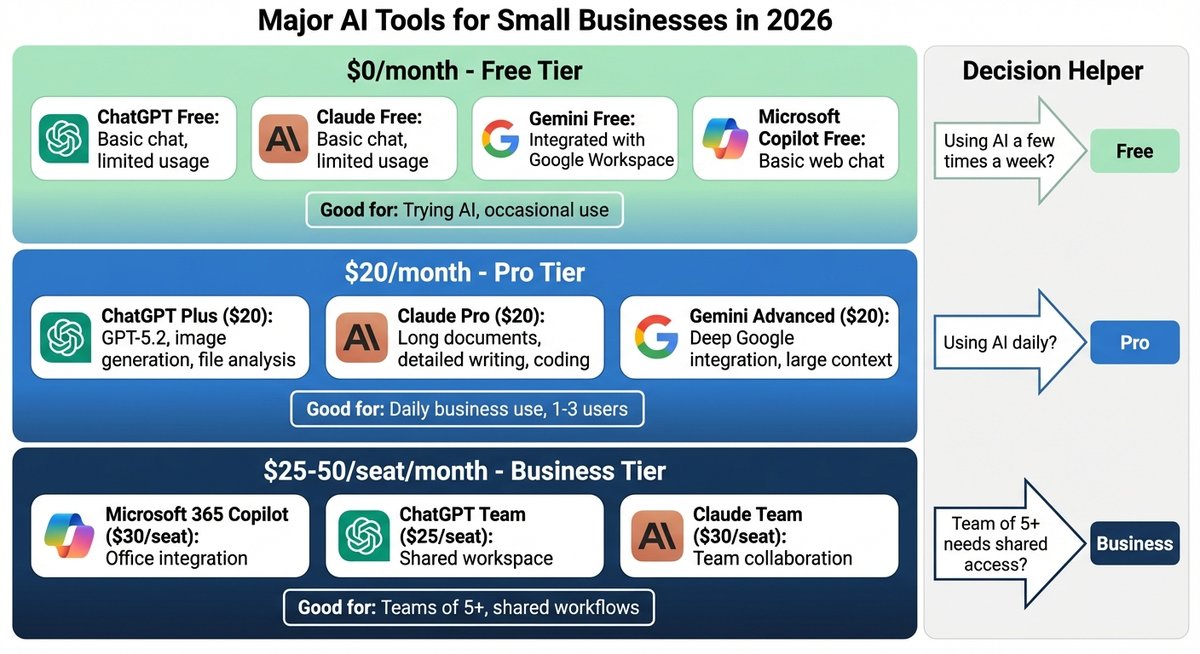
Here’s what AI actually costs, stripped of the marketing language.
The Free Tier ($0/month)
Every major AI tool has a free version. ChatGPT Free, Claude Free, and Gemini Free all give you access to basic AI chat. The limitations are real: you’ll hit usage caps during busy periods, you won’t get the most powerful models, and some features (like file uploads or image generation) may be restricted. But for trying things out and handling occasional tasks, free is genuinely functional.
Good for: Testing. Occasional use. Seeing if AI is useful for your specific work before paying anything.
The Pro Tier ($20/month)
ChatGPT Plus, Claude Pro, and Gemini Pro all cost $20/month. At this price, you get the latest and most capable models, higher usage limits, file uploads, and most features. For a single user who works with AI daily, this is the sweet spot.
The honest math: if a $20/month tool saves you two hours per week, and your time is worth more than $2.50/hour, it pays for itself. For most business owners, the ROI is obvious within the first week.
Good for: Daily AI use. One or two people who use AI as a core part of their workflow.
The Team Tier ($25-30/seat/month)
ChatGPT Team ($25/seat), Claude Team ($25/seat billed annually), and Google Workspace Business Standard ($14/seat with Gemini included) are designed for teams. You get shared workspaces, admin controls, and data privacy commitments (your conversations aren’t used to train the AI models).
For a 10-person team, this runs $140-300/month. The question isn’t whether you can afford it; it’s whether enough of your team will actually use it to justify the per-seat cost. Most consultants recommend starting with 3-5 heavy users, running a 60-day pilot, and measuring hours saved before rolling out to everyone.
Good for: Teams of 5+ who need shared access and data privacy guarantees.
The Trap ($100-200+/month)
The $100-200/month tier exists (ChatGPT Pro, Claude Max, Gemini Ultra). These plans are for developers, researchers, and power users who need maximum capability. Unless you’re writing code or doing heavy technical work, you almost certainly don’t need this tier.
The bigger trap is stacking subscriptions. The average professional working with AI now spends $200-300/month across multiple tools. Most of that is wasted. You don’t need ChatGPT Plus AND Claude Pro AND Gemini Advanced AND a specialized writing tool AND an image tool. Pick one or two. Use them well. Cancel the rest.
What Small Businesses Are Actually Using
Let’s cut through the noise. Based on adoption data and real-world usage patterns in early 2026, here’s what small businesses are actually doing with AI:
The things that work (high adoption, clear ROI):
Email drafting and response. This is the number-one use case. Every AI tool does this well, and the time savings are immediate and measurable. A business owner who writes 20+ emails a day can save 30-60 minutes daily.
Document summarization. Contracts, reports, long email threads, meeting transcripts. Paste it in, get the key points. This saves time every single day and the AI is consistently good at it.
Meeting transcription and notes. Zoom AI Companion, Otter.ai, and Fireflies.ai all join your meetings and produce summaries with action items. Zoom’s version is free. This is arguably the single highest-value free AI feature available today.
Social media content drafting. Writing captions, generating post ideas, adapting one piece of content across platforms. AI is fast at this, though you’ll need to edit the output to not sound generic.
Customer review responses. Paste a review into any AI tool, ask for a professional response. Three minutes instead of fifteen. Works for Google, Yelp, or any platform.
The things people try and abandon (low retention):
AI chatbots for customer service on small business websites. The technology works, but most small businesses don’t have enough website traffic to justify the setup time. If you get fewer than 100 website visitors a day, a simple FAQ page is probably more effective.
Full content generation without editing. Businesses that try to publish AI-generated blog posts, emails, or social media without human editing get punished. Consumer trust drops 50% when people suspect content is AI-generated. Only 26% of consumers prefer AI-generated content, down from 60% in 2023. The winning approach is AI drafts, human edits.
Expensive “AI-powered” tools that are just ChatGPT with a prettier interface. A category of tools charges $50-100/month to provide what is essentially a wrapper around the same AI you can access for $20/month or free. Before paying for any specialized AI tool, ask yourself: “Could I do this by pasting into ChatGPT or Claude?” If yes, cancel the subscription.
What Can Go Wrong
This chapter would be dishonest without addressing the risks.
AI makes things up. Not occasionally. Regularly. It will invent statistics, cite sources that don’t exist, and fabricate details with the confident tone of a tenured professor. Never publish, send, or act on AI output without checking the facts. This is especially dangerous for financial data, legal language, and medical claims.
AI-generated content can hurt your brand. The backlash against AI-generated content is real and measurable. McDonald’s had to pull an AI-generated ad campaign. The British Museum removed AI-generated social media posts. Customers are actively looking for signs that content is AI-written, and they trust businesses less when they find them. The rule: use AI to create first drafts, but the final version should sound like you.
Your data goes somewhere. When you paste text into a free AI tool, that text may be used to train future AI models. If you’re working with customer data, financial information, or anything sensitive, use paid plans (which typically don’t train on your data) or don’t paste it into AI at all. Chapter 4 covers this in detail.
It’s easy to overspend. As Marcus learned, buying five AI subscriptions and hoping for the best is a common and expensive mistake. Start with one tool. Get good at using it. Expand only when you’ve hit the limits of what one tool can do.
Key Takeaways
- AI in 2026 is a drafting and organizing tool that requires human editing and oversight, not a magic solution.
- Four tools matter: ChatGPT, Claude, Gemini, and Microsoft Copilot. Everything else is either a wrapper or a specialty tool.
- Start at the free tier ($0) or the pro tier ($20/month). Don’t stack subscriptions.
- The highest-ROI uses are email, document summaries, meeting notes, and content drafting.
- AI-generated content without human editing will hurt your brand. The winning formula is AI drafts, human finishes.
This Week’s Action Items
Next Up
Now that you know what’s out there, Chapter 2 helps you find the right starting point for your business. We’ll run a bottleneck audit to identify where you and your team are losing the most time, and build your first three AI use cases.