Chapter 1. The AI Landscape for HR
Overview
- Purpose: Survey of current AI tools relevant to human resources. What works, what is hype, and where to start without risking compliance.
- You will learn:
- Which categories of AI tools are actually useful for HR work today
- How to separate genuine capability from marketing hype
- A practical framework for evaluating any AI tool through a compliance and bias lens
- Where to start based on your specific HR role and team size
- Tools needed: ChatGPT (free tier), Google Gemini (free tier), or Anthropic Claude (free tier)
- Time to implement: 30 minutes to survey the landscape; 5 minutes for the hands-on exercise
The Story: “The Inbox That Never Ends”


Nina Okafor stared at her inbox: 147 unread messages. It was 7:42 a.m. on a Monday, she had not yet taken off her coat, and the number was already climbing. She was the entire HR department at Greenleaf Manufacturing, a 150-person operation in Charlotte that made custom packaging for the food industry. One hundred and fifty employees, one HR manager, and every single question about benefits, payroll, time off, safety training, and workplace disputes landed in her lap.
She scanned the subject lines. Three emails from the same employee asking whether his dental plan covered orthodontics for dependents. A forwarded chain from the plant supervisor about a worker who had been late six times in two weeks. A reminder from the state DOL about an updated posting requirement due by Friday. An email from the CFO asking her to “put together a quick summary” of last year’s turnover numbers. And, buried halfway down, a message from the operations manager that started with the words no HR person wants to read on a Monday morning: “We need to talk about letting someone go.”
She also had three new hires starting on Wednesday. Their onboarding packets were half-finished. The I-9 verification checklist was sitting in a browser tab she had not closed since Thursday. Somewhere in her drafts folder was a benefits orientation slide deck that still referenced last year’s premium rates.
Nina pulled out her phone and texted Derek Lawson, a talent acquisition manager she had met at a regional SHRM conference the year before. Derek ran recruiting at a 400-person software company in Denver and always seemed to have a handle on things. “How do you keep up?” she typed. “I’m drowning.” Derek’s reply came fast: “Have you tried using AI for the repetitive stuff? Not the decision-making. The drafting, sorting, answering-the-same-question-for-the-tenth-time stuff. Seriously. Start with ChatGPT or Claude. Free tiers. Give it one of those benefits questions and see what happens. It won’t replace your judgment, but it’ll give you two hours back today.” Nina looked at her inbox again. One hundred and forty-nine messages now. She opened a new browser tab.
The Real AI Toolkit: What Exists Today for HR
Before Nina starts experimenting, and before you do the same, it helps to know what is actually out there. The AI landscape for HR is noisy. Vendors are bolting the words “AI-powered” onto everything from applicant tracking systems to break-room coffee machines. Your job is not to learn every tool. Your job is to understand the categories, know what each category does well and poorly, and pick a starting point.
Here is where things stand right now: only about 13% of HR teams currently use AI, and fewer than 15% apply it beyond recruiting. But the investment wave is coming fast. Fifty-seven percent of U.S. small businesses are investing in AI, up from 36% in 2023, and 55% of companies are increasing their HR technology spend. The AI HR technology market is expected to triple by 2030. Meanwhile, 30% of employees already use AI daily in some capacity at work. There is a real gap between where adoption is today and where spending is headed, and that gap is your window of opportunity. The HR leaders who start learning now will be the ones who shape how their organizations adopt these tools, rather than reacting after the fact.
The time savings are already measurable. The average small business worker using AI saves 5.6 hours per week. Managers save even more – 7.2 hours per week compared to 3.4 hours for individual contributors. For someone in Nina’s position, that is nearly a full day back every week.
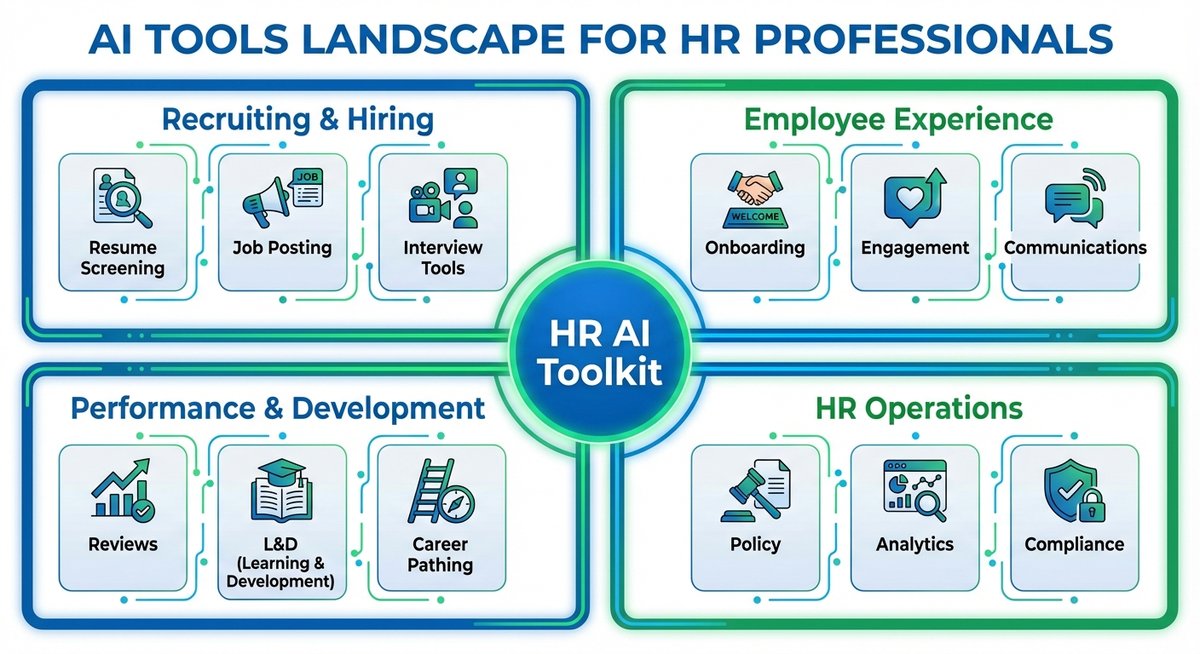
Here is the landscape, broken into four categories that matter for HR work.
Conversation and Writing Tools (Large Language Models)
These are general-purpose AI tools that can read text, generate text, summarize documents, and answer questions. They are not built specifically for HR, but they are immediately useful for HR work because so much of what you do involves writing and reading.
The major tools:
- ChatGPT (OpenAI): The most widely known. Free tier available. Paid plans (ChatGPT Plus) run $20/month and give you access to the latest model and faster responses.
- Claude (Anthropic): Strong at long-document analysis, careful with nuance, tends to flag risks. Free tier available. Pro plan is $20/month.
- Gemini (Google): Integrated with Google Workspace. Free tier available. Gemini Advanced is $20/month and comes bundled with the Google One AI Premium plan.
- Microsoft Copilot: Built into Microsoft 365. If your organization already pays for Microsoft 365 Business or Enterprise, Copilot integration is available as an add-on at $30/user/month.
What they do well:
- Draft job descriptions, offer letters, termination letters, and policy documents in minutes
- Summarize long documents such as compliance updates, benefits plan summaries, or employee handbook revisions
- Answer factual HR questions (“What are the FMLA eligibility requirements?”) with reasonable accuracy
- Rewrite existing text for tone, clarity, or reading level
- Generate interview question sets for specific roles
- Create first drafts of employee communications, memos, and FAQ documents
What they do not do well:
- Provide guaranteed legally accurate advice (they can get details wrong, especially around state-specific employment law)
- Access your internal company data unless you specifically provide it in the conversation
- Make judgment calls about individual employees
- Maintain memory across sessions on free tiers (each conversation typically starts fresh)
- Replace actual legal counsel for terminations, investigations, or discrimination claims
Cost range: Free to $30/user/month.
One thing to know before you roll these tools out to your team: there is a trust gap. Forty-five percent of small business workers worry that “too much AI” could harm their company’s reputation, and 30% admit they act more excited about AI in front of colleagues than they actually feel. This matters for HR leaders. When you introduce AI to your team, expect some quiet skepticism alongside the public enthusiasm. Acknowledging that tension, rather than ignoring it, will help you build genuine buy-in.
Bottom line: These tools are your best starting point. They require no IT setup, no procurement process, and no vendor contract. You can open one in a browser tab right now and start using it. The risk is low as long as you treat every output as a draft that you review before sending.
HR-Specific AI Platforms
These are tools built specifically for human resources functions. They use AI to automate or assist with tasks like onboarding workflows, employee questions, compliance tracking, and people analytics.
Notable platforms:
- BambooHR: HRIS built for small and mid-size companies, typically 50-500 employees. Its “Ask BambooHR” AI assistant answers employee questions about policies, benefits, and time off with citations from your actual company documents and respects role-based access permissions so employees only see information they are authorized to view. Pricing runs approximately $6-8/employee/month.
- Leena AI: AI-powered HR service delivery. Handles employee queries, automates ticketing, and integrates with common HRIS platforms. Pricing is custom and typically starts around $3-5/employee/month.
- Paradox (Olivia): Conversational AI focused on recruiting. Automates screening, scheduling, and candidate communication. Enterprise pricing, typically requires a demo and contract.
- Eightfold AI: Talent intelligence platform that uses AI for matching, workforce planning, and career pathing. Enterprise pricing.
- Lattice AI: Performance management and engagement platform with AI-assisted review writing and goal tracking. Plans start around $11/person/month.
- Rippling: Workforce management platform that ships multi-step AI agents for HR, IT, and Finance workflows. What sets Rippling apart is its unified approach: HR connects directly to IT provisioning, so onboarding a new hire can automatically trigger device shipping, account creation, and access to tools like Slack and GitHub. Starts around $8/user/month.
- Gusto: Payroll-first platform for companies under 200 employees with compliance AI that automates payroll processing, tax filings, and handbook updates as regulations change. Transparent tiered pricing makes it easy to understand what you are paying for.
- Paylocity: Mid-market payroll and HR platform with an AI Assistant that answers employee questions and takes actions like submitting time-off requests. Also includes employee engagement features like community boards and surveys. Custom pricing based on company size.
What they do well:
- Automate repetitive employee inquiries (“How many PTO days do I have left?”)
- Provide structured workflows for onboarding, offboarding, and status changes
- Integrate with your existing HRIS, payroll, and benefits systems
- Offer dashboards and analytics that surface patterns in turnover, engagement, and headcount
What they do not do well:
- Work well at very small companies (though the threshold has dropped – tools like BambooHR serve the 50-500 range, and Gusto targets companies under 200)
- Deliver value without significant setup and configuration time
- Eliminate the need for HR judgment on sensitive matters
- Function as standalone systems; they typically layer on top of your existing tech stack
Cost range: $3-25/employee/month; most require annual contracts and implementation fees.
One trend worth noting: 70% of small and mid-size businesses already use some form of employee self-service portal. AI chatbots are making self-service dramatically better. Companies report saving up to 40% on HR costs through automation and generative AI in self-service channels. If you want to explore this without committing to a full platform, tools like Rezolve.ai (which lives inside Microsoft Teams, so there is no new app for employees to learn) and isolved’s “Always-On HR” chatbot offer focused self-service AI without requiring a full HRIS migration.
Bottom line: If you are a solo HR practitioner at a very small company, a general-purpose LLM is still your fastest starting point. But mid-market-friendly tools like BambooHR (built for 50-500 employees) and Humanly (specifically designed for companies with 200-2,000 employees) have made this category more accessible than it was even a year ago. The old assumption that HR-specific AI requires 500+ employees and an enterprise budget no longer holds. If you lead HR at a mid-size organization, these platforms are worth evaluating once you have clarity on which specific problem you are trying to solve.
Recruiting and ATS Tools
AI has made the most visible impact in recruiting. According to SHRM data, 87% of companies use AI in recruiting in some form, but only 49% of HR teams use it specifically for recruiting – and far fewer apply it to other HR functions. That concentration tells you something: recruiting is where AI proved its value first, and it is still where the most mature tools are. Twenty-four percent of mid-market companies plan investments in AI-powered recruitment tools in the near term. Applicant tracking systems and recruiting platforms now use AI for resume screening, candidate matching, job description optimization, and interview scheduling.
Notable tools:
- Greenhouse: ATS with AI-assisted candidate scoring and structured interview kits. Pricing is custom and typically starts around $6,000/year for smaller companies.
- Lever (now part of Employ): ATS with CRM capabilities and AI-assisted sourcing. Custom pricing.
- hireEZ (formerly Hiretual): AI-powered sourcing tool that searches across platforms to find passive candidates. Plans start around $149/month.
- Textio: AI writing tool specifically for job postings. Analyzes language for bias and predicts performance of job descriptions. Starts around $8,000/year.
- HireVue: Video interviewing platform with AI-assisted assessments. Enterprise pricing. Worth noting: HireVue discontinued its facial analysis feature in 2021 after criticism, and now focuses on text-based assessment of interview responses.
What they do well:
- Screen large volumes of applications quickly and surface the strongest matches
- Identify biased language in job postings before they go live
- Automate interview scheduling and candidate communication
- Source passive candidates across LinkedIn, GitHub, and other platforms
- Track recruiting funnel metrics and time-to-fill data
What they do not do well:
- Eliminate bias from hiring (AI screening tools can replicate or amplify existing biases in your historical hiring data)
- Evaluate culture fit, soft skills, or potential with the same reliability as technical qualifications
- Comply automatically with emerging AI hiring laws (New York City Local Law 144, Illinois AI Video Interview Act, and similar regulations require specific audit and disclosure obligations)
- Replace the human conversation that closes a candidate
Cost range: $149/month to $50,000+/year depending on company size and features.
Bottom line: If you are filling more than 10 roles per month, AI recruiting tools can save significant time on sourcing and screening. If you are filling fewer than five roles per month, a general-purpose LLM for drafting job descriptions and screening criteria may be all you need. Regardless of volume, you must understand the bias and compliance implications before turning on automated screening.
Employee Engagement and Survey Tools
These platforms use AI to analyze employee sentiment, generate survey questions, identify themes in open-ended responses, and predict turnover risk.
Notable tools:
- Culture Amp: Employee experience platform with AI-assisted survey analysis and action planning. Custom pricing, typically for companies with 200+ employees.
- Qualtrics Employee Experience: Enterprise survey and analytics platform with AI-driven text analysis. Enterprise pricing.
- Perceptyx: People analytics and survey platform with AI-driven insights. Enterprise pricing.
- 15Five: Performance and engagement platform with AI-assisted review summaries. Starts around $4/user/month.
- Peoplebox: OKR and performance management platform with AI features. Starts around $7/user/month.
What they do well:
- Analyze open-ended survey responses at scale (reading 500 free-text responses manually takes days; AI can surface themes in minutes)
- Track engagement trends over time and flag declining sentiment in specific departments
- Generate follow-up questions and action recommendations based on survey results
- Benchmark results against industry data
What they do not do well:
- Detect sarcasm, cultural nuance, or context-dependent language reliably
- Replace manager conversations about engagement and retention
- Guarantee anonymity when analyzing small teams (if a department has four people, AI-surfaced themes can still identify individuals)
- Predict individual turnover with high accuracy (aggregate trends are more reliable than individual predictions)
Cost range: $4/user/month to enterprise pricing.
Bottom line: AI-powered survey analysis is one of the most underrated tools in HR. If you are already running engagement surveys, the analysis capabilities alone can save you days of manual work. If you are not running surveys yet, start with a free LLM to analyze open-ended feedback you are already collecting from exit interviews or onboarding check-ins.
Hype vs. Reality: A Practical Filter
Every week brings a new announcement: “AI will eliminate 40% of HR tasks by next year.” “This platform uses AI to predict which employees will quit.” “Fully automated hiring is here.” Some of it is real. A lot of it is not. Here is how to tell the difference.
The Three-Question Filter
Before you evaluate any AI tool for HR, run it through these three questions:
Question 1: Does this tool make decisions about people, or does it help me make better decisions?
This is the most important distinction in HR AI. A tool that drafts a job description for your review is helping you. A tool that automatically rejects candidates without human review is making decisions. The first is low risk. The second carries legal, ethical, and compliance risk that scales with every applicant it processes. Always know which side of this line a tool falls on.
Question 2: What data is this tool trained on, and could that data contain historical bias?
If a recruiting tool learns from your past hiring decisions, and your past hiring decisions were not equitable, the tool will replicate those patterns at machine speed. Ask vendors directly: What data trains the model? Can you audit the outcomes for adverse impact? If they cannot answer clearly, that is your answer.
Question 3: Does this tool comply with the AI employment laws in my jurisdiction?
AI regulation in employment is moving fast. New York City requires bias audits for automated employment decision tools. Illinois regulates AI in video interviews. The EU AI Act classifies employment-related AI as high-risk. Colorado has enacted AI discrimination protections. More states are following. If a vendor cannot tell you how their tool complies with these laws, you are taking on that compliance risk yourself.
The Hype Spectrum
The table below maps common AI capabilities in HR against their actual maturity level today.
| Capability | Status | Notes |
|---|---|---|
| Drafting job descriptions | Works well today | LLMs produce solid first drafts. You still need to review for accuracy, legal language, and company voice. |
| Summarizing policy documents | Works well today | Feed an LLM your employee handbook section and ask for a plain-language summary. Highly effective. |
| Answering routine benefits questions | Works well today | Provide the plan details as context and the tool can answer common questions accurately. Always verify. |
| Writing interview questions | Works well today | Specify the role, competencies, and interview format. Output is usable with light editing. |
| Resume screening at scale | Works, with caution | Effective for high-volume roles with clear qualifications. Bias risk is real and must be audited. Regulatory requirements are evolving. |
| Analyzing open-ended survey responses | Works well today | One of the highest-value use cases. AI surfaces themes across hundreds of responses in minutes. |
| Predicting individual turnover | Overhyped | Aggregate trends are useful. Individual predictions are unreliable and raise serious privacy and ethics concerns. |
| Fully automated hiring | Overhyped | No responsible organization should remove humans from hiring decisions entirely. Regulatory environment is moving against this. |
| AI-conducted performance reviews | Overhyped | AI can help draft review language and summarize feedback. It should not evaluate employee performance independently. |
| Replacing HR judgment on terminations | Not viable | Legal, emotional, and contextual complexity makes this inappropriate for AI. Use AI to draft documentation, not to make the call. |
| Real-time sentiment analysis from Slack/email | Ethically questionable | Technically possible but raises surveillance concerns, trust erosion, and potential legal issues. Proceed with extreme caution if at all. |
One emerging category that does not fit neatly into the table above is “agentic AI.” Fifty-two percent of talent leaders plan to add AI agents to their teams in 2026. These are not chatbots. They are autonomous systems that execute multi-step workflows – end-to-end interview scheduling across multiple calendars, cross-department onboarding coordination that triggers IT provisioning, facilities access, and manager notifications in sequence, or benefits enrollment that walks a new hire through plan selection and automatically submits elections. Gartner predicts 40% of enterprise applications will integrate task-specific AI agents by 2026. This is early, and most of the current implementations are at large enterprises, but it is worth watching. The platforms in the HR-Specific section above, particularly Rippling, are already shipping early versions of these agents.
Where to Start: Matching Tools to Your HR Role
The right starting point depends on your role, team size, and the specific problems eating your time. Here are practical recommendations for each of the three HR profiles in this book.
If You Are a Solo HR Practitioner (Like Nina)
You do not have time for a six-month platform evaluation. You need relief this week. Start here:
- Sign up for one free LLM today. ChatGPT, Claude, or Gemini. Pick one. Do not spend time comparing them; they are all capable enough for your first use cases. Open it in a browser tab and keep it open during your workday.
- Use it to draft your three most repetitive written communications. For Nina, that might be the benefits FAQ email she rewrites every open enrollment, the new-hire welcome message she customizes for each start date, and the template she uses when a manager asks for help documenting a performance issue. Give the tool context about your company, the audience, and the tone you want. Review and edit the output. Save the prompts that work.
- Feed it a compliance document and ask it to summarize the action items. That state DOL posting update sitting in Nina’s inbox? Paste it into the tool and ask: “What specific actions does my company need to take, and by what deadline?” This does not replace reading the document yourself, but it gives you a head start and helps you confirm you have not missed anything.
If You Lead Talent Acquisition (Like Derek)
You are already drowning in applications and scheduling logistics. AI can help you move faster without cutting corners.
- Use an LLM to improve your job descriptions. Paste your current posting into the tool and ask it to identify jargon, gendered language, unnecessary requirements, and barriers that might reduce your applicant pool. This is free and takes five minutes per role.
- Evaluate one AI sourcing or screening tool for your highest-volume role. If you are filling the same type of position repeatedly, a tool like hireEZ or your ATS’s built-in AI screening can reduce your initial review time significantly. Before you turn it on, document how you will audit it for adverse impact. Run a test with a set of anonymized past applications and compare the AI’s selections against your own.
- Automate your interview scheduling. If you are still coordinating calendars over email, this is low-hanging fruit. Tools like Calendly, GoodTime, or your ATS’s built-in scheduler can eliminate hours of back-and-forth per week. This is not glamorous AI, but it is effective AI.
If You Are an HR Director (Like Priya)
You are thinking about scale, compliance, and organizational risk. Your starting point is different.
- Draft an AI use policy for your HR team before anyone starts experimenting. Your team is probably already using ChatGPT. You need to know about it and set guardrails. At minimum, the policy should address: what data can and cannot be entered into AI tools, which decisions require human review, and how AI-generated outputs should be documented. Chapter 8 of this book covers AI governance in detail.
- Identify your highest-volume, lowest-risk HR process and pilot an AI tool there. For Priya, that might be drafting first-round responses to employee benefits questions, generating FAQ documents for policy changes, or summarizing exit interview data. Start where the upside is real and the compliance risk is manageable. HR tech budgets are rising – 55% of companies are increasing spend – so the organizational appetite for these investments is growing. For mid-market teams, core HRIS platforms with AI features typically cost $6-15/employee/month, with specialized AI add-ons running $3-10/employee/month. Many tools offer free trials or pilot programs, so you can prove value before committing to a contract.
- Begin tracking emerging AI employment regulations in your jurisdictions. If you operate in New York City, Illinois, Colorado, or the EU, you may already have compliance obligations related to AI in employment. If you operate in multiple states, the patchwork is going to get more complicated, not less. Assign someone on your team to monitor this.
Try This Now (5 Minutes)
You do not need to finish this chapter to start. Open a browser tab right now and try this exercise.
Step 1: Write down the three HR tasks that consume the most time in your typical week. Be specific. Not “recruiting” but “rewriting the same rejection email for each candidate.” Not “compliance” but “reading the updated state posting requirements and figuring out what changed.”
Step 2: Pick the one task from your list that is the most repetitive and the least dependent on your personal judgment. That is your best starting candidate for AI.
Step 3: Open ChatGPT (chat.openai.com), Claude (claude.ai), or Gemini (gemini.google.com). All three have free tiers. Copy and paste this prompt, filling in the brackets with your specifics:
I am an HR professional at a [company size] company in [industry]. I need to [specific task]. Here is the context: [paste relevant details, such as a policy excerpt, a job description, or the question you need to answer]. Please draft [the specific output you need: an email, a summary, a set of interview questions, etc.]. Use a professional but approachable tone.
Step 4: Review the output. It will not be perfect. It will be a starting point. Edit it, adjust it, and note how long the whole process took compared to doing it from scratch.
If you just saved fifteen minutes, you have found your first use case. If the output was not useful, try a different task from your list. The goal today is not to transform your department. The goal is to prove to yourself, with your own task, that this works.
Key Takeaways
- AI tools for HR fall into four practical categories today: general-purpose writing tools, HR-specific platforms, recruiting tools, and engagement analytics. The general-purpose writing tools (ChatGPT, Claude, Gemini) are your fastest, lowest-risk starting point. They are free, require no setup, and can help with the drafting and summarizing work that consumes hours of your week.
- Always evaluate AI tools through a compliance and bias lens first. Before you adopt any tool that touches hiring, performance, or employment decisions, ask three questions: Is it making decisions or helping me make decisions? What data is it trained on? Does it comply with AI employment laws in my jurisdiction? If you cannot answer all three, slow down.
- Pick one tool, learn it well on a real task, and then expand. The biggest mistake HR professionals make with AI is trying to evaluate every platform at once. Start with one free tool and one repetitive task. Get good at that. Build confidence. Then expand to the next use case.
This Week’s Action Items
Next Up
In Chapter 2, we will stop surveying and start doing. You will pick one HR task, automate it with AI today, and see your first real time savings.